Backlog refinement: a step-by-step planning poker guide
Backlog refinement is the ongoing work of turning a messy backlog into a small set of items the team understands well enough to size and commit to. Planning poker (hidden votes, a simultaneous reveal, and focused discussion) is one of the most common ways teams do that sizing together, but the technique only works as well as the prep, roles, and timebox around it. This guide walks through preparing items, running the round, recognizing when something needs to be split or sent back to discovery, sample agendas, and how the flow changes with a live Jira or Linear connection.
Backlog refinement is an activity, not a meeting type with fixed rules
The 2020 Scrum Guide dropped "Backlog Refinement" from its list of formal events entirely. What remains is a description of an ongoing activity: the Product Backlog gets refined continuously to add detail, order, and size to items, with no mandated cadence, attendee list, or timebox. Whether your team does this in one weekly session, in short daily touch-ups, or asynchronously, all of that is a team decision, not a rule from the Guide.
The Guide is also silent on technique. It doesn't mention story points, planning poker, or Fibonacci anywhere. Sizing is called out as the Developers' responsibility, full stop. Story points and planning poker are popular, well-tested community practices, not a Scrum requirement, so treat everything below as a strong default you can adapt rather than a spec you must follow exactly.
Refinement is also distinct from Sprint Planning, even though the two are easy to blur. Refinement happens continuously, ahead of time, to get items small and clear enough to be called Ready; Sprint Planning is the separate, timeboxed event at the start of a sprint where the team turns those Ready items into a sprint goal and a forecast. Refinement prepares the work — Sprint Planning is where the team commits to it.
Prepare candidate items and acceptance criteria before the session
The single biggest lever for a good refinement session happens before anyone opens a voting tool. Pull together the next sprint or two's worth of candidate items, put a draft description and acceptance criteria on each one, and flag any obvious dependencies or open questions in the item itself. None of that needs to be perfect. It needs to be enough that the team can discuss the item without the product owner writing it from scratch out loud.
Decide on your estimation scale ahead of time too. Fibonacci-style decks work well when uncertainty should grow with size, T-shirt sizes suit very early or unrefined items, and a custom deck can mirror how your team already talks about work. Whatever you pick, keep it consistent across sessions so estimates stay comparable within the team.
A refinement session runs better when responsibilities are explicit rather than assumed. The moderator (often the product owner or a scrum master, but not always) keeps the session moving: presenting one item at a time, fielding clarifying questions without letting discussion sprawl, calling for the vote, running the reveal, and deciding when an item is Ready, needs another round, or should be split or sent to discovery.
Participants who estimate (usually the developers and testers who will build and verify the work) are responsible for asking real clarifying questions, voting honestly and independently rather than anchoring on whoever spoke first, and engaging with outlier discussion instead of just averaging toward the middle. Stakeholders or other observers can sit in to answer questions without voting, so their presence doesn't quietly pressure the numbers.
Moderator: sets the agenda, presents each item, keeps clarifying questions on-topic, calls for votes and reveals, and records the outcome
Estimators (developers, testers, anyone doing the work): ask questions, vote privately and independently, explain outlier votes honestly
Observers or stakeholders: can answer questions and provide context, but don't vote and shouldn't steer the number
Some tools model this as a permission rather than a fixed role: SprintBee, for example, lets any participant be granted moderator separately from whether they're voting as a developer, tester, or observer, so more than one person can facilitate
Run the round: clarify, vote, reveal, discuss, revote, accept
Once an item is on the table, the flow is the same whether you're using cards, sticky notes, or software: the moderator or product owner explains the goal and acceptance criteria, the team asks clarifying questions, and open questions that need research get parked rather than solved on the spot. Then everyone picks an estimate privately and hidden (no calling out numbers first), and all the votes are revealed at the same time.
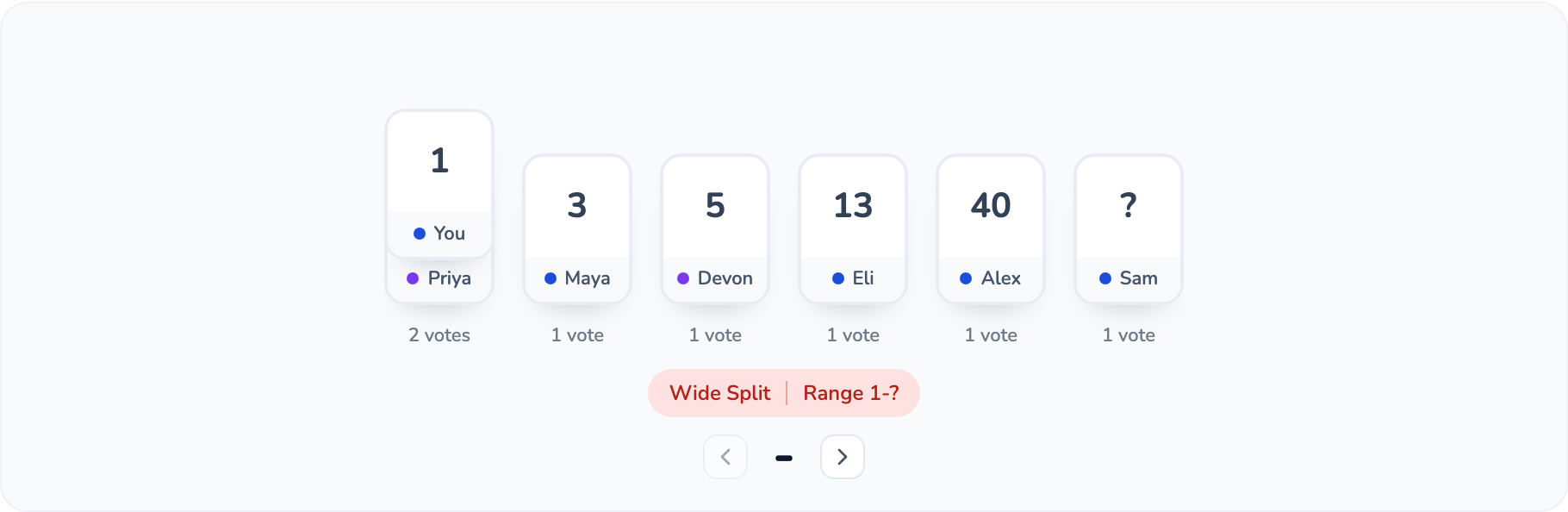
The reveal is where the real work starts. If everyone lands close together, confirm and move on. If the spread is wide, focus discussion specifically on the highest and lowest votes: ask what those people saw that others didn't. That's usually where a missing dependency, a hidden edge case, or a difference in scope assumptions surfaces. Many tools automate this signal for you: SprintBee, for instance, tags a revealed round as Consensus, Split, or Wide Split depending on how far apart the votes landed, so the moderator knows at a glance whether a quick confirmation or a real discussion is needed.
After discussion, revote once. If the team converges on a size that comfortably fits within a sprint, accept the estimate and mark the item Ready. If it still doesn't converge after a couple of rounds, that's a signal to stop voting and either split the item or send it back to discovery (see below) rather than debating the same two numbers a third time. If your team tracks story points, remember they measure relative effort, complexity, and uncertainty compared to other items your team has sized — not hours, and not a number that transfers meaningfully to another team's estimates.
Signals an item should be split, or sent back to discovery
Not every item that comes to refinement is ready to be sized on the first pass, and forcing a number onto something the team doesn't understand yet just produces a confident-looking guess. Two different problems tend to show up at the vote-and-discuss step, and they call for different next steps.
When the team understands the work but it's simply too big, split it. Mike Cohn's SPIDR framework is a concrete way to do that rather than guessing at a halfway point: Spike out a research task first if genuine unknowns are blocking a size; split by Path, shipping the happy path as one story and pushing error states or alternate flows into their own; split by Interface when the same feature needs to work across multiple devices or channels; split by Data when a subset of data types or ranges can ship before the rest; or split by Rules, shipping a minimal rule set first and expanding it later. Each resulting slice should still be independently valuable and releasable on its own. Cutting a story in half so neither half ships alone is task decomposition, not a real split.
When the team doesn't understand the work well enough to size it at all: acceptance criteria keep changing mid-discussion, a dependency or system nobody on the team has touched is involved, or votes are wildly scattered even after a full discussion round. That's a signal to pull the item out of refinement, spin up a time-boxed spike or research task, and bring it back once there's enough shared understanding to estimate honestly.
Split signals: the team can't converge after ~2 rounds of discussion; the estimate lands at or near the top of your deck; the item bundles more than one independently shippable piece of work (fails INVEST's "Independent" and "Small")
Discovery signals: acceptance criteria are still shifting during discussion; the item depends on a system or integration nobody on the team has worked with; votes stay wildly scattered even after discussing outliers, suggesting different mental models of the work rather than a size disagreement
SPIDR split techniques: Spike, Path, Interface, Data, Rules. Split by whichever axis actually separates independently valuable slices of the work
Tools that support splitting can help here too: SprintBee, for example, can split an item into linked child issues directly from the queue
A reusable backlog refinement checklist
Copy this list into your team's wiki, ticket template, or refinement doc and run through it before and during every session. It holds regardless of which agenda length or estimation scale you use.
Next 1–2 sprints' worth of candidate items are already in the backlog and ordered
Each candidate item has a draft description and acceptance criteria written down
Known dependencies, risks, or open questions are noted on the item itself
The team has agreed on an estimation scale ahead of time and uses it consistently
A moderator is assigned and knows which items are in scope for the session
A timebox is set per item and for the whole session
Votes are cast privately, revealed together, and outlier discussion happens before any revote
Items that don't converge after about two rounds are flagged to split or send to discovery, not argued a third time
Accepted items are marked Ready with their agreed estimate recorded
Items sent to discovery or split get a clear owner and next step before the session ends
A tight, focused session works well for a small backlog or a team that's already comfortable with the flow. Keep it to two to four items and timebox each step so one story doesn't eat the whole session.
0–3 min. Opening: restate the goal for today and confirm which 2–4 items are in scope
3–15 min. Clarify: walk each item's goal and acceptance criteria; team asks questions (about 3–4 min per item)
15–25 min. Vote, reveal, discuss outliers, revote for each item (about 2–3 min per item once it's clarified)
25–29 min. Flag anything that didn't converge or looks oversized for a split or discovery follow-up
29–30 min. Close: confirm which items are now Ready and note any follow-ups and owners
Example 45-minute refinement agenda
A longer session suits a bigger or more ambiguous backlog, or a team carrying over items from a previous split or discovery task. The extra time goes toward clarifying more items up front and explicitly triaging what still needs work.
0–5 min. Opening plus a quick review of anything carried over or split since the last session
5–25 min. Clarify 4–6 items: goal, acceptance criteria, and open questions logged (not solved live)
25–40 min. Vote, reveal, discuss outliers, revote per item; timebox each item (about 2–3 min) so no single story dominates
40–43 min. Identify items that need a spike or a split before they can be sized, and assign an owner to each
43–45 min. Close: recap which items are Ready and confirm the candidate list for next session
Running refinement with a Jira connection
With a live Jira connection, a moderator can pull candidate items into the queue by keyword search, one of a few quick presets (current sprint, my open issues, recently updated), a raw JQL query for more control, or by pasting a bare issue key or URL to import it directly. Non-moderator participants can still paste in a key or URL, but it comes in as a request for the moderator to approve rather than an automatic add. Worth knowing if you want the whole team adding candidates between sessions. You can try this import flow yourself, without a real Jira connection, in the demo room.
If your room has story-point write-back turned on, an accepted estimate can write back to a mapped Jira field automatically once the team accepts it: numeric, plain-text, or single-select fields are all supported, and non-numeric values like a question mark or a pass card are simply skipped rather than causing an error. One thing this doesn't do: Jira webhooks only keep already-imported items' fields fresh, they don't automatically drop brand-new Jira issues into your queue, so someone still needs to search for and import new candidates. Jira integration is a Jira Cloud feature on SprintBee's paid plans; the Free plan doesn't include a working Jira connection.
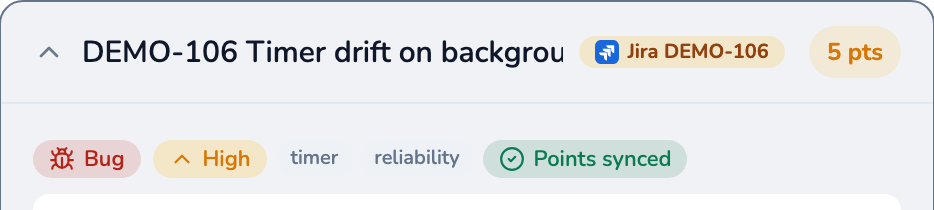
Once accepted, an estimate with write-back turned on syncs to the mapped Jira field — shown here as the synced badge on the item's history entry.See the SprintBee Jira integration
Running refinement with a Linear connection
Linear's workflow looks a little different because Linear doesn't have a JQL-style query language or a project concept the way Jira does. Search runs full-text against your query (or lists newest-first issues when the search box is empty), and rooms scope search to one or more Linear teams instead of projects, with structured filters for team, state, assignee, and labels available on both paths.
Linear also has exactly one native estimate field, so there's no field-mapping step to configure: SprintBee just parses the accepted card value as a number and checks it against that issue's team's own estimation scale in Linear (Fibonacci, exponential, linear, or T-shirt, plus whatever extended or zero-allowed settings that team has turned on). If the value isn't numeric, or it isn't actually on that team's configured scale, the write is skipped with a clear reason rather than rounded or forced through. Like Jira, Linear integration is a paid-plan feature backed by an organization-level connection.