Async planning poker: voting windows, deadlines, and fewer meetings
Async planning poker keeps the core mechanic of planning poker (independent judgment first, discussion second) but spreads voting across a window instead of a single meeting. A moderator opens a set of queued items with a deadline, everyone votes on their own ballot at their own pace, and only genuine disagreements come back for live discussion.
By SprintBee Team · Reviewed by SprintBee Product Team · Updated July 11, 2026
Async planning poker replaces the single synchronous meeting with a voting window: a moderator picks queued items and a deadline, participants cast hidden votes whenever it suits their schedule, and the window closes automatically (or the moderator closes it early) once the deadline passes. Items the team agrees on can auto-accept; items with real disagreement come back for a short, focused conversation instead of a full estimation meeting.
It works best for teams with little or no overlapping working hours, teams that estimate more items than a single meeting can comfortably cover, and items that are already well refined: ones that only need a size, not a clarifying conversation. If an item still needs its acceptance criteria worked out, that conversation should happen first; async voting is for sizing, not for discovery.
The pattern itself (hide votes until a deadline, then bring only genuine disagreement back for discussion) works with a shared spreadsheet or a chat thread just as it does with a dedicated tool. The sections below describe how SprintBee implements it specifically, as one concrete example of the pattern.
Opening a voting window
Opening a window is a moderator action. It defaults to every unestimated item in the queue, though the moderator can narrow that down before opening. The deadline can be a 24, 48, or 72 hour quick pick, or a custom date and time for the team's own cadence.
A room can have one open voting window at a time, so the option to open a new one is hidden while one is already running. That does not block live estimation elsewhere: a moderator can still run a normal, synchronous round on items that are not part of the open window.
Hidden ballots and consensus rules
By default, votes stay hidden from everyone, including moderators, until the window closes — the same hidden-vote-then-discuss principle that makes any planning poker round useful, just stretched across hours instead of minutes. When opening the window, the moderator also chooses how disagreement gets handled automatically once it closes:
Off: nothing auto-accepts; every item comes back for review once the window closes.
Exact match: every cast vote has to be identical for the item to auto-accept.
Adjacent deck values: every cast vote has to fall within two neighboring deck positions, which also works for T-shirt-size decks since it compares card position rather than a numeric value.
How auto-accept actually decides
Auto-accept needs at least two cast votes, so a single vote never quietly converges on its own. A stray "?" (not enough information) vote blocks auto-accept entirely, since it is a genuine signal that the item is not ready to size. When an item does auto-accept, story-point write-back to Jira or Linear fires exactly as it would for a manual accept.
On a room split into Dev and QA, each discipline is evaluated independently against the chosen consensus rule, so Dev can auto-accept while QA still needs a look, or the other way around. The side that didn't converge gets a one-click "Accept median" option once the window closes.
Casting a ballot
Participants vote from a segmented "Async ballot" view alongside the normal live stage, so switching between an open window and any concurrent live round is a single toggle, not a different tool. Votes can be changed as many times as someone likes until the window closes — there's no early commitment penalty for changing your mind after thinking about an item longer.
Observers can read the queue and follow along, but they don't get a ballot to vote on, matching how they work in a live round. A sticky bar keeps a running count of items left to vote on and jumps straight to the next one that still needs a vote, so working through a longer async queue doesn't mean scrolling and hunting.
Reminders
Reminders are opt-in and understated by design: each person can get one email, roughly four hours before the deadline, and only if they still have items left to vote on. Every reminder includes an unsubscribe link, and requesting one only needs an email address, not a SprintBee account. There's no second reminder and no escalating nag; it's a single nudge for people who are genuinely behind.
Closing a window and reviewing divergence
A window closes on its own once the deadline passes (checked roughly every 30 seconds), or a moderator can close it early with "Close now," which reveals everything immediately regardless of how many people have finished voting. "Cancel window" is different again: it detaches the items back into the plain queue without evaluating or revealing anything, and any votes already cast are preserved for the next time the item comes up.
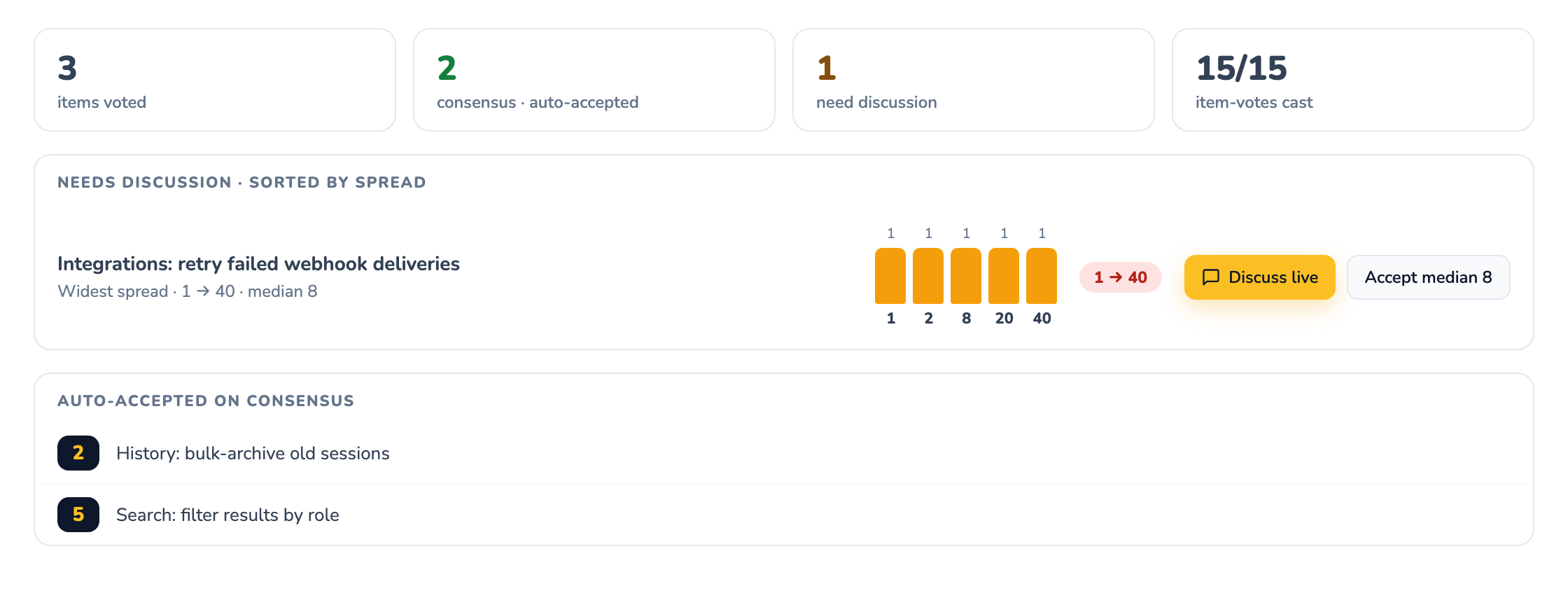
Once a window closes, a divergence review board shows what happened: a summary strip, a "Needs discussion" list sorted with the widest spread first (each with a vote-distribution histogram and median, split by Dev/QA where that applies), and an "Auto-accepted on consensus" list for everything that converged cleanly. From there, a moderator can send any item back to "Discuss live" on the normal stage, or accept its median value with one click — the same kind of focused conversation a live round would have had, just limited to the items that actually needed it.
The discipline that matters here is independent voting before any discussion happens, not the specific tool used to run it. The same weekly cadence works with a shared spreadsheet or a chat thread if that's what a team already has:
Monday: the product owner adds this week's candidate items to the queue with descriptions and acceptance criteria, and a moderator opens a voting window with a Wednesday or Thursday deadline.
Monday through the deadline: each person votes whenever their day allows; votes stay hidden and can be changed right up until the window closes.
Deadline: the window closes automatically. Consensus items are already accepted (and already written back to Jira or Linear if that's configured); items with a real spread land on the divergence board.
Same day or next: a short synchronous or threaded conversation covers only the items on the "Needs discussion" list, focused on what the highest and lowest voters actually saw differently.
Anything still unresolved: either gets accepted at its median, split into smaller items, or rolls into next week's window with the new context captured.
Async vs. live planning poker: the tradeoffs
Async voting removes the scheduling cost of getting everyone in a room at once, and it scales well when there are more items to size than a single meeting can cover. It also has real limits: it strips out the real-time energy of a live discussion, and for an item nobody has thought through yet, it can quietly stretch out over days instead of resolving in a five-minute conversation. Pure async works best on items that are already well refined and only need a size, not on items that still need their scope clarified.
The two modes aren't exclusive. A live round can run at the same time as an open async window on a different set of items, and any async item can be pulled back to the live stage for discussion. Many remote teams default to async for routine sizing and keep live rounds for anything genuinely ambiguous or newly discovered.
One more distinction worth knowing if chat notifications matter to your team: the async voting mechanism itself, including consensus rules and reminders, is available on every SprintBee plan, including Free. Slack and Microsoft Teams notifications that announce when a voting window opens or is about to close are a separate, paid feature layered on top of async voting, not a requirement to use it.
If your team is new to the hidden-vote-then-discuss mechanic itself, it's worth reading the fuller explanation of how a single round works, since async voting is the same idea spread across a window rather than a meeting.
A moderator opens a voting window over a queue of items with a deadline. Teammates vote privately on their own schedule from a ballot, votes stay hidden until the window closes, and items where the votes already agree are settled automatically. The team only meets to discuss items where the votes split.
How long should an async voting window stay open?
One to two working days suits most teams: long enough to cover time zones and focus time, short enough that the item context is still fresh. Pair the deadline with a reminder the day it closes rather than stretching the window across a week.
What happens when async votes disagree?
Divergent items carry over to a short live discussion — the async round has already done the work of finding them. Let the outlier voters explain what they saw, then re-vote live or split the item if it turns out to be two pieces of work.
Does async planning poker replace the estimation meeting?
It replaces most of it. Items whose votes agree never need a meeting; what remains is a much shorter conversation focused only on genuine disagreement, which is where the discussion was valuable all along.
Estimate together
Run your next planning session for free.
Create a SprintBee room, share one link, and help your team vote, reveal, discuss, and align in minutes.